Easy Invoice & Estimates Maker
- 4.2
- Rating
- 50.00K
- Installs
- Free
- Price

 Analysis by App-foxy
When I need to send a clean invoice without sitting down at a computer, Easy Invoice & Estimates Maker is the kind of business app I would keep on my phone. Its central promise is simple: create a professional-looking PDF invoice quickly, then send it to a customer. After using it, I found that its real value is not in replacing a full accounting system. It is in shortening the awkward gap between finishing a small job and giving the customer something formal to pay.
That distinction matters. A freelancer, repair worker, tutor, cleaner, designer, or other independent professional may not need payroll, inventory management, or complicated bookkeeping every day. They may simply need to turn a finished service into a readable document while the details are still fresh. This app focuses on that moment, and the focused approach makes it approachable for people who find traditional invoicing software excessive.
Easy Invoice & Estimates Maker is a free business app from Lefage, LLC, with optional in-app purchases ranging from $5.49 to $499.99 per item. It is suitable for everyone from an age-rating perspective, works on Android 7.0 and later, and its current version is 9.4.1. The app has built a visible user base, with over 50 thousand installs and a 4.2 average from around 975 ratings. Those figures suggest a practical tool that many people have tried, while also leaving room for the usual differences in expectations between a quick invoice maker and a complete financial platform.
You May Also Like

 Blood Strike: 2.5 Anniversary
Blood Strike’s Loadouts Turn Every Drop Into a Tactical Gamble
A close look at Blood Strike’s custom loadouts: how fast access to signature weapons reshapes its battle royale rhythm, rewards preparation, and narrows the gap between fights.

 Pandora - Music & Podcasts
Pandora’s Music Is Easy to Start, but Harder to Recover
Pandora’s strength is its low-effort path from a seed to a station. Its weak spot is how much confidence it asks you to place in connection, setup, and quiet recovery.

 8 Ball Pool
8 Ball Pool Is Built on Rivalries, Rematches, and Routine
A close look at the rivalries, rematches, shared routines, and unanswered safety questions that turn a quick pool match into a persistent mobile community.

 Samsung Music
Samsung Music’s Quiet Strength Is Playing What You Already Own
Its reach comes less from spectacle than from dependable access to a personal library. That simplicity is both the app’s strongest retention engine and its ceiling.

 AccuWeather: Weather Radar
AccuWeather Review: A Quick, Clear Forecast for Everyday Decisions
For everyday plans, the best forecast is the one you can understand quickly. AccuWeather makes rain timing, radar, and local conditions easy to act on, with a few trade-offs.

 Hill Climb Racing
Why Hill Climb Racing Still Turns Crashes Into One More Run
A tiny car, a bumpy hill and one more upgrade: Hill Climb Racing keeps resurfacing because its simple chaos makes every near-miss feel personal.
More From Our News Desk
View All News


Why fast PDF invoicing is the app’s defining strength
I’d start this section by looking beyond the speed of filling in an invoice: the useful question is how smoothly the finished PDF moves from the app to the customer. That makes connectivity part of the real workflow, especially when I’m wrapping up a job away from my desk. I’ll also consider what habits help keep a mobile invoice accurate when the moment is busy.
The useful part is the finished document, not just the form
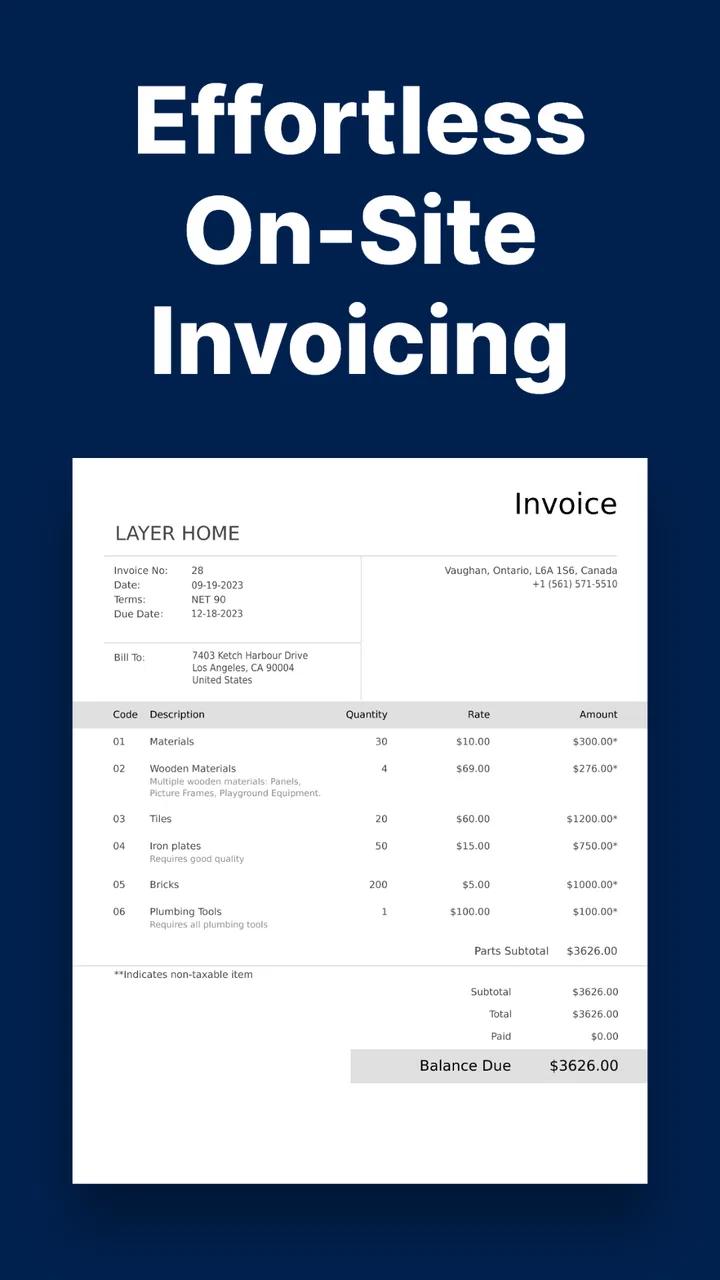
The strongest capability here is the ability to produce a professional PDF invoice from a template instead of composing a document manually. That sounds ordinary until you consider how often small business owners handle work from a phone. A blank document, a spreadsheet, or a message containing payment details can all technically communicate an amount, but they do not give the customer the same clear structure as an invoice.
A template also reduces small presentation mistakes. The customer can see who provided the service, what was supplied, how much it costs, and what the document is for. I particularly like this workflow for one-off jobs because it turns an informal conversation into a proper record without requiring me to design the layout each time. The benefit is not merely visual polish; it is the reduction of steps between “the work is done” and “the customer has a document to act on.”
The practical advantage is speed with enough structure to look trustworthy. That is different from claiming that the app handles every part of business administration. I see it as a document-production tool first. If your main problem is getting an invoice out promptly, that focus is helpful. If your problem is managing a large operation, the focus may feel narrow.
Templates change how I approach small jobs
Without a template-based app, I might postpone invoicing until I return to a laptop, remember the correct wording, or locate an old document to copy. Those delays are easy to underestimate. A customer may be ready to settle a bill while the details are fresh, but the provider ends up waiting because creating a consistent invoice feels like a separate administrative project.
Here, I can treat the invoice as the final step of the job rather than a task for later. That is especially useful when the work is mobile: visiting a property, completing a consultation, delivering a design draft, or finishing a repair away from an office. A PDF is also more convenient than sending a loosely formatted text message when the customer needs to save, print, or forward the invoice.
The app’s store summary emphasizes professional PDF invoices and invoice templates, and that is the right way to understand its role. I would not install it expecting a full replacement for tax software. I would install it because I want a repeatable way to create a presentable invoice from a phone.
What I would prepare before creating the first invoice
The first-use experience is easier if I already know the information I want to place on the document. Before opening the editor, I would gather my business name, contact details, customer information, service description, amount, and any payment instructions I normally include. This is a small preparation step, but it prevents the first invoice from becoming a hunt through messages and notes.
I also recommend deciding on a consistent description style. For example, instead of writing a vague line such as “project,” I would use a short description that tells the customer what was completed. This makes the resulting PDF more useful later, particularly when the customer has several invoices from different providers. The app can make the document quickly, but the quality of the information still depends on what I enter.
For recurring work, I would keep a personal checklist outside the app or in my normal notes system: customer name, service period, work completed, amount, and any agreed terms. That approach avoids relying on memory when I am creating an invoice in a hurry. It also highlights an important trade-off: a fast invoice generator improves the document workflow, but it does not remove the need for an organized business process around it.
How the workflow feels in an everyday situation
Imagine I have just finished a small home repair. The customer asks for an invoice before I leave. With a conventional approach, I might promise to send one later, then return to my computer, format the document, check the total, export it, and send it. That is not impossible, but it creates an unnecessary delay and gives the transaction a less finished feeling.
With Easy Invoice & Estimates Maker, I would open the app, work from an invoice template, enter the customer and job details, check the amount, create the PDF, and send it while the appointment is still fresh. The customer receives a document that can be stored with other records rather than a casual message that may be difficult to find later. For me, this is where the app earns its place: it compresses a task that often gets postponed into a short closing routine.
I would still pause for a final review before sending. Mobile entry makes it easy to mistype a name, omit a line, or enter the wrong amount. The app helps with the document format, but a template cannot detect whether I charged for the correct number of hours or described the correct service. My best habit would be to read the completed invoice as if I were the customer, checking the identity, work description, total, and any payment wording.
Sending the PDF is more useful than leaving it inside the app
The PDF format is important because it gives the invoice a life beyond the editing screen. A customer can save it, forward it to an accounts contact, or print it if needed. For a solo operator, that can make the difference between a document that looks temporary and one that feels ready for business records.
It also supports a cleaner division of responsibilities. I can use the app to create the invoice, send the finished document through my usual communication method, and keep my broader bookkeeping elsewhere if that is how I already work. This is a sensible arrangement for someone who has an accountant, a spreadsheet, or another system for long-term records but wants a faster way to prepare the source document.
That flexibility is useful, but I would not confuse sending a PDF with tracking payment. After sending, I still need a reliable way to note whether the customer has paid, whether a reminder is due, and how the transaction should be recorded. If those tasks are central to my work, a more comprehensive accounting service may be the better primary tool, with this app used only for quick document creation.
The best scenario is a mobile solo business
The people who gain the most are those who work independently and invoice in relatively small batches. A tradesperson moving between appointments, a photographer finishing a session, a language tutor billing a student, or a consultant wrapping up a short engagement can all benefit from having the invoice step available at the point of service.
This is also a good fit for someone starting a small business who wants to appear organized without learning a complicated financial platform immediately. The template approach lowers the barrier to producing a document that looks more deliberate than a handwritten note or a message. It can help establish a consistent habit early: complete the work, create the invoice, send it, and then record the transaction in the place used for bookkeeping.
Another worthwhile scenario is occasional paid work. If I only invoice a few customers each month, a large subscription-based accounting package may feel like too much administration. A focused invoice maker can be easier to open when needed. The free starting price makes experimentation less risky, although I would pay attention to which functions are available without purchasing anything before building my entire workflow around it.
Where it compares well with spreadsheets and word processors
A spreadsheet gives me control, but that control comes with maintenance. I need to format the page, keep the layout consistent, export the file correctly, and avoid disturbing formulas or labels. A word processor has a similar problem: it can create an invoice, but I am responsible for making the document look like an invoice every time.
The template-centered approach is more convenient for repeated, straightforward documents. I spend less energy on page design and more on checking the actual business details. For a user who does not enjoy formatting, that is a meaningful improvement. The trade-off is that a spreadsheet may be better when I need custom calculations, a detailed service breakdown, or a personal reporting system that extends beyond the invoice itself.
Compared with a full accounting app, Easy Invoice & Estimates Maker appears more focused and less intimidating. A larger platform is usually the better choice when I need connected expenses, tax reporting, inventory, bank reconciliation, customer balances, or detailed financial history. This app makes more sense when those functions are handled elsewhere or are simply unnecessary for the way I work.
The main trade-off: convenience versus deeper business control
The biggest limitation is also the reason the app feels approachable. A quick invoice tool is unlikely to give me the same depth as a complete accounting suite, and I should not expect it to. If my business has many customers, frequent recurring billing, complex tax rules, multiple staff members, or strict reporting requirements, I would want to evaluate a more specialized system before relying on a mobile template maker as my central record.
The optional purchase range also deserves attention. The app is free to install, but some capabilities may involve purchases, and the listed range stretches from a modest amount to a much higher maximum per item. I would check the purchase screen carefully and identify exactly what I need before committing. For occasional invoicing, paying for a useful upgrade could still be reasonable; for a larger business, I would compare the total cost and included workflow against established accounting alternatives.
There is another subtle trade-off in using a phone: speed can encourage rushed entry. On a small screen, reviewing a long description or several line items may be less comfortable than doing so on a desktop. My solution would be to use concise descriptions, prepare recurring information in advance, and perform a deliberate final check before sending. The app reduces friction, but it should not encourage me to skip accuracy.
Who should skip it
I would skip this app as my main business platform if I need a complete financial command center rather than an invoice creator. A company that depends on detailed accounting reports, complex customer accounts, inventory, or collaborative administration will probably outgrow a focused PDF workflow quickly. In that situation, the convenience of a template is not enough to compensate for the missing depth of a broader system.
I would also think twice if my invoices require highly specialized layouts or extensive calculations. Templates are most useful when my documents follow a fairly normal structure. If every project needs a different contract-style presentation, complicated pricing logic, or extensive supporting material, a customizable document system may give me more control.
Finally, I would not use it as the only place where I track money. Creating and sending an invoice is one stage of the process. I still need a dependable record of what I billed, when I sent it, whether it was paid, and how it fits into my accounts. Keeping that information in a separate bookkeeping routine is essential if I want a reliable picture of the business.
Small habits that make the app more effective
My first tip is to create a repeatable review sequence rather than trusting the speed of the editor. I would check the customer identity, service wording, amount, and final PDF before sending. This takes little time and catches the errors that matter most.
My second tip is to use the app at the natural end of a job, not at the end of the week. Immediate invoicing keeps details accurate and reduces the pile of unfinished administration. It also makes the tool’s main advantage—fast PDF creation—part of the business routine instead of an emergency solution.
My third tip is to separate document creation from financial control. I would use the app for the polished invoice, then place the transaction in my chosen bookkeeping method. That combination gives me the convenience of a mobile template without pretending that a PDF alone is a complete accounting record.
My fourth tip is to test the free workflow with a low-risk invoice before purchasing anything. I would learn how comfortable the entry process feels, whether the resulting document suits my customers, and how easily I can move the PDF into my normal communication and record-keeping habits. This is more useful than deciding based only on the app’s short description.
My verdict for independent professionals
Easy Invoice & Estimates Maker succeeds when the problem is simple but persistent: I need a professional invoice now, and I do not want to open a desktop program or learn a full accounting system. Its template-based PDF workflow is practical, especially for mobile workers, occasional freelancers, and small service businesses that already have another way to manage their finances.
I appreciate that the app’s usefulness comes from a specific job rather than an oversized promise. It helps turn completed work into a document that can be sent and stored, and that can make a small operation feel more organized. The free entry point is inviting, while the optional purchases mean I would inspect the available upgrades before depending on it for regular business use.
My recommendation is straightforward: try it if fast, presentable invoices are the missing link in your current routine. Use it alongside proper bookkeeping, review every PDF before sending, and choose a fuller accounting solution if your business needs detailed financial management. For the right user, this focused approach is not a weakness. It is exactly why Easy Invoice & Estimates Maker can be useful.
Developed by Lefage, LLC, the app is a sensible choice for anyone who values a quick mobile workflow over an all-in-one business suite. I would recommend it to a friend who invoices independently and wants less formatting work, while being clear that its best role is the front end of invoicing—not the entire back office.
FAQs for Easy Invoice & Estimates Maker
01What is Easy Invoice & Estimates Maker used for?
Easy Invoice & Estimates Maker is designed for freelancers, contractors, small businesses, and independent professionals who need to create invoices and estimates from a mobile device. After reviewing its workflow, the app appears focused on simplifying everyday billing tasks, allowing users to prepare professional-looking documents, organize customer details, and keep invoicing activities more manageable without relying on complicated accounting software.
02Can I create and customize invoices and estimates with the app?
Yes, the app is built around creating both invoices and estimates, with options to enter client information, products or services, prices, quantities, taxes, discounts, and payment details. Depending on the version and device, customization may include business information, branding, document formatting, and templates. Users should check the available settings before downloading if a specific logo, currency, or layout is essential.
03Can invoices and estimates be shared with customers?
Easy Invoice & Estimates Maker generally supports sharing completed documents digitally, which is useful when sending an invoice or estimate immediately after finishing a job. Documents can typically be exported or shared through common phone applications such as email or messaging services. Before using it for business, confirm which file formats and sharing options are included in the current version.
04Does Easy Invoice & Estimates Maker track payments or manage business finances?
The app is primarily intended for preparing invoices and estimates rather than replacing full accounting or bookkeeping software. It may help users monitor document status or keep basic records, but advanced features such as bank synchronization, detailed expense tracking, payroll, tax reporting, or complete financial statements may not be available. Businesses needing comprehensive accounting should use it alongside dedicated financial tools.
05Is Easy Invoice & Estimates Maker free to download and use?
The availability of free features, subscriptions, advertisements, or one-time purchases can vary according to the platform and the app version. Basic invoice creation may be accessible without payment, while advanced templates, unlimited documents, branding options, or additional management tools could require an upgrade. Review the Google Play or App Store listing carefully to understand pricing and in-app purchase conditions before downloading.
Pros
- Create professional invoices and estimates quickly from your phone.
- Useful templates help keep documents consistent and polished.
- Track invoice status to monitor pending and completed payments.
- Customer and item details can be reused to save time.
- Suitable for freelancers and small businesses with basic billing needs.
Cons
- Advanced accounting and inventory tools may be limited.
- Some features or templates may require a paid subscription.
- Mobile data entry can feel slower for large invoices.
- Payment processing options may vary by country and provider.
- Limited customization may not suit complex business workflows.

Easy Invoice & Estimates Maker
Gallery